> ## Documentation Index
> Fetch the complete documentation index at: https://help.emotive.io/llms.txt
> Use this file to discover all available pages before exploring further.
# Connect Hubspot Forms <> Emotive
> Sync SMS signups from your Hubspot Forms into Emotive.
Before you get started with syncing SMS signups from Hubspot Forms to Emotive, you'll need to create a new List Growth API in Emotive, then install Hubspot Forms in your Emotive account.
## Create Your API Key in Emotive
1. Log into Emotive and navigate to [List Growth > Integrations](https://www.emotiveapp.co/list-growth/tools).
2. Click to add a new List Growth API.
3. Name your new API something easily identifiable, such as "List Growth API - Hubspot Forms Sync".
4. Under *Welcome Message*, select the Flow you want your new subscribers to receive after signing up.
5. Click **Next**.
6. Copy your new List Growth API's List ID as shown below.
 ## Install Hubspot Forms on Emotive
1. Navigate to [Integrations](https://www.emotiveapp.co/settings/integrations) in your Emotive dashboard.
2. Locate Hubspot Forms and select **Add Integration**.
3. Toggle ON "Hubspot Forms Sync #1".
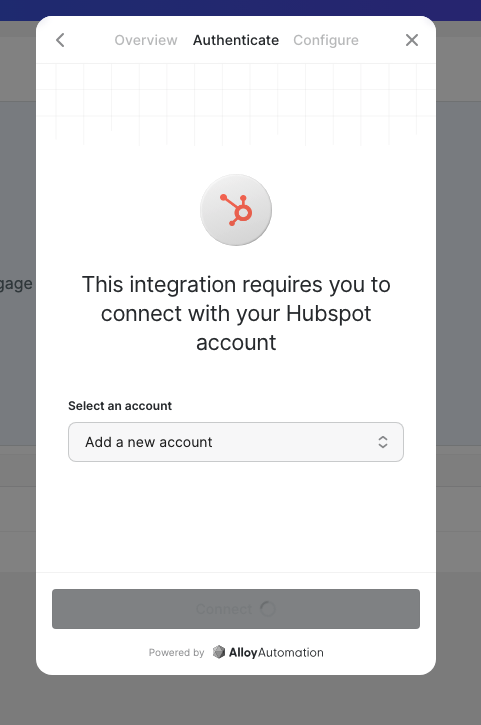
4. Select your Hubspot Forms account, insert your credentials to connect.
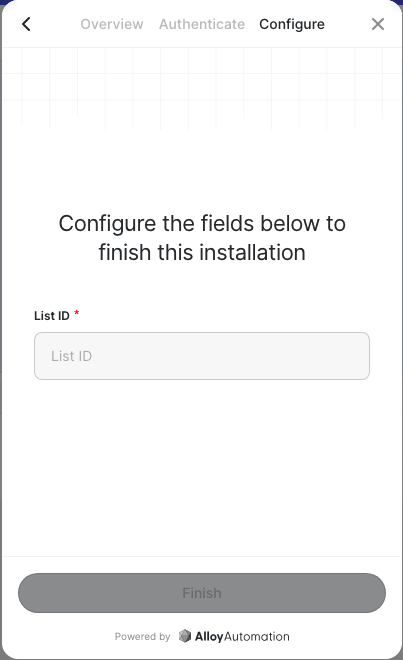
5. Paste your \*\*List ID \*\*from your new Emotive List Growth API.
6. Click **Finish**.
## Install Hubspot Forms on Emotive
1. Navigate to [Integrations](https://www.emotiveapp.co/settings/integrations) in your Emotive dashboard.
2. Locate Hubspot Forms and select **Add Integration**.
3. Toggle ON "Hubspot Forms Sync #1".
4. Select your Hubspot Forms account, insert your credentials to connect.
5. Paste your \*\*List ID \*\*from your new Emotive List Growth API.
6. Click **Finish**.
 That's it! Your Signups from your Hubspot Forms will now sync to Emotive.