> ## Documentation Index
> Fetch the complete documentation index at: https://help.emotive.io/llms.txt
> Use this file to discover all available pages before exploring further.
# Connect Emotive <> Recharge
> Learn how to grow and retain your list by integrating Emotive and Recharge.
Emotive's integration with Recharge can to help you supercharge subscription growth. With Emotive + Recharge you can:
* **Grow Your Subscriptions**. The integration lets you segment out non-subscribed customers so you can invite them to join via SMS.
* **Retain Subscription Customers**. New Flow triggers allow you to create full lifecycle campaigns that lock in subscriptions.
This integration is available for Shopify stores only.
## Features of the Integration
Once you set up the integration, Emotive can:
* Track which orders are subscription orders processed by Recharge.
* Segment based on whether a customer has a subscription, what product they’re subscribed to, and how many times they’ve received their subscription product.
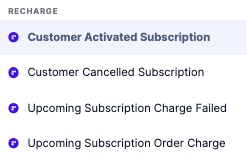
* Trigger a two-way Flow when a customer signs up, their order is coming up, their payment fails, or they cancel.
## Create an API Key in Recharge
To retrieve your API Key from Recharge, you can either contact their support team for assistance, or:
* Log into your Recharge App and navigate to **API Tokens**.
* Create a new API Key with the following permissions:
* Copy your new API Key.
## Install Recharge on Emotive
* Navigate to [Integrations](https://www.emotiveapp.co/settings/integrations).
* Locate **Recharge** and select **Add Integration**.
* Paste your API Key from Recharge.
* **Save** your changes.
The historical import will run automatically - it can take up to 72 hours to complete.
That's it! Your Recharge data will now sync to your Emotive account.
## Create a Recharge Segment
You can create segment based on whether a customer has a subscription, what product they’re subscribed to, and how many times they’ve received their subscription product.
### Target Non-Subscribers
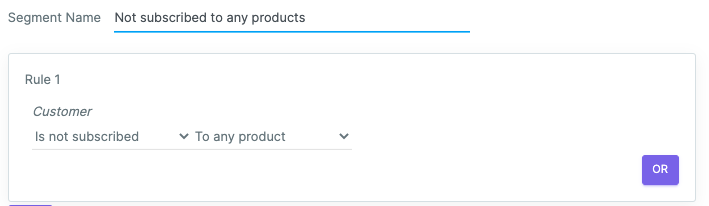
This is a great option if you want to send a Broadcast inviting your audience without subscriptions to sign up. Just create a segment of your list that “is not subscribed” “to any product.”
 ### Target by Subscription Product
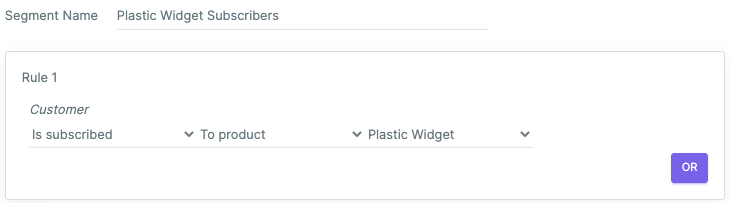
You can create a segment of customers who have subscribed, including what product they subscribed to.
### Target by Subscription Product
You can create a segment of customers who have subscribed, including what product they subscribed to.
 ### Target by Subscription Quantity
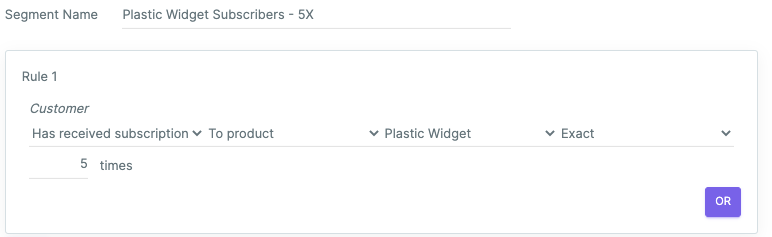
You can segment based on how many times a subscriber has received their subscription product.
### Target by Subscription Quantity
You can segment based on how many times a subscriber has received their subscription product.
 ## Recharge Templates
You can find Broadcast templates in our template library that you can send to your segments to grow your subscription program. Visit the library [here](https://emotive.io/template-library) and click on “Subscription.”
## Recharge Flows
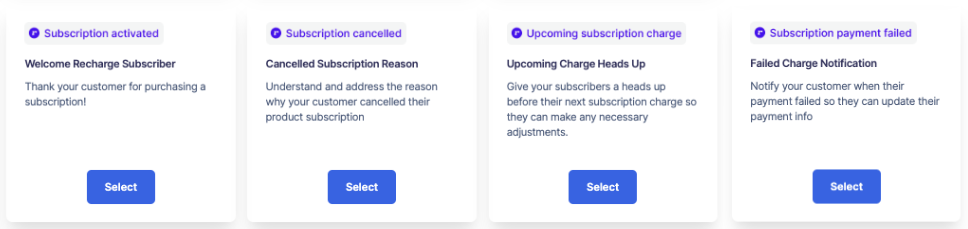
The Recharge Flow triggers in Emotive allow you to create full lifecycle campaigns that lock in subscriptions.
Here’s what you can do:
* Welcome new customers, trigger when subscription is activated
* Get feedback, follow up with an experience when a subscription is canceled
* Remind customers of upcoming subscription charge
* Retain subscribers by triggering messaging if a payment method fails
**To get started with a Recharge Flow Template:**
* Navigate to **Flows**.
* Scroll to the bottom to find and select a Recharge template.
* Customize the copy to match your brand.
* Add segmentation, if needed.
## Recharge Templates
You can find Broadcast templates in our template library that you can send to your segments to grow your subscription program. Visit the library [here](https://emotive.io/template-library) and click on “Subscription.”
## Recharge Flows
The Recharge Flow triggers in Emotive allow you to create full lifecycle campaigns that lock in subscriptions.
Here’s what you can do:
* Welcome new customers, trigger when subscription is activated
* Get feedback, follow up with an experience when a subscription is canceled
* Remind customers of upcoming subscription charge
* Retain subscribers by triggering messaging if a payment method fails
**To get started with a Recharge Flow Template:**
* Navigate to **Flows**.
* Scroll to the bottom to find and select a Recharge template.
* Customize the copy to match your brand.
* Add segmentation, if needed.
 **To build a Recharge Flow from scratch:**
* Navigate to **Flows**.
* Select a blank template.
* Choose from one of the Recharge Triggers.
* Craft your copy, and add segmentation if needed.
**To build a Recharge Flow from scratch:**
* Navigate to **Flows**.
* Select a blank template.
* Choose from one of the Recharge Triggers.
* Craft your copy, and add segmentation if needed.