

Create your Webhooks
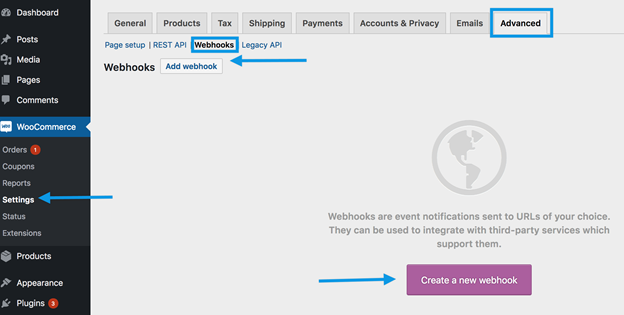
To add new webhooks:- Log into your WordPress Dashboard.
- Navigate to WooCommerce > Settings > Advanced > Webhooks.
- Click Add Webhook.
Configure your Webhooks
Emotive’s integration requires 2 webhooks. One for Order Status Processing, and another for Order Status Completed. Follow the instructions below to get them configured:Webhook #1
- Name your webhook something easily identifiable, such as “Emotive Order Status Processing”.
- Set the Status field to Active.
- Select the Topic to be Action.
- Set the Action Event to be woocommerce_order_status_processing.
- Set Delivery URL to https://webhooks.emotiveapp.co/api/woocommerce/order/processing?brand_id=<brand-id>
- Contact Emotive to get your brand id, do not include these symbols ”<>”.
- Click on **Save Webhook **at the bottom of the page.
Webhook #2
- Name your webhook something easily identifiable, such as “Emotive Order Status Completed”.
- Set the Status field to Active.
- Select the Topic to be Action.
- Set the Action Event to woocommerce_order_status_completed.
- Set Delivery URL to https://webhooks.emotiveapp.co/api/woocommerce/order/completed?brand_id=<brand-id>
- Contact Emotive to get your brand id, do not include these symbols ”<>”.
- Click on **Save Webhook **at the bottom of the page.
Place a Test Order to Verify Installation
- Place an order on your WooCommerce site with a valid mobile phone number.
- Apply a 100% off coupon to place a $0 order, if desired.
- Contact Emotive Support at support@emotive.io and ask if they received the order.